On-Screen Indicators
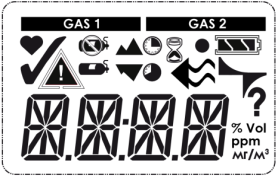
Figure 2 Display
|
|
Only displayed for two gas detectors. The label above this bar shows which gas concentration is currently displayed |
|
|
Sensor life Symbol – Indicates the end of sensor life |
|
|
Bump Check Symbol – Indicates successful bump test or calibration |
|
|
Alarm Symbol – Indicates alarm state. |
|
|
No Gas Cylinder – Indicates cal gas should not be applied and device must be exposed to fresh air |
|
|
Cal Gas Cylinder – Indicates cal gas must be applied |
|
|
PEAK Symbol – Indicates a PEAK reading or high alarm |
|
|
Minimum – Indicates a minimum value or low alarm |
|
|
Short Term Exposure Limit (STEL) Symbol – Indicates a STEL alarm |
|
|
Time Weighted Average (TWA) Symbol – Indicates a TWA alarm |
|
|
Hourglass – Indicates user should wait |
|
|
Device confidence indicator |
|
|
Flow check symbol - Indicates that a flow check is being prepared or should be executed |
|
|
Battery condition - Indicates the battery charge level |
|
|
Indicates a battery alarm when flashing |
|
|
Electronic pulse check symbol - Indicates a currently running electronic check of the sensor |
|
|
Indicates required interaction |
|
|
Gas concentration |
|
|
Volume percent |
|
|
Parts per million |
|
|
mg/m3 |