Replacing the Battery
WARNING!
Never replace the battery in a hazardous area. This could result in an explosion.
Failure to follow this warning can result in serious personal injury or death.
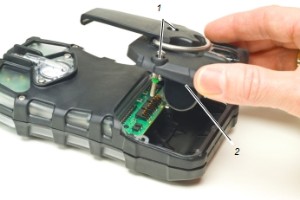
Figure 13 Battery Replacement
|
1 |
Captive screw |
2 |
Battery pack |
| 1. | Unscrew the two captive screws on the rear of the device. |
| 2. | Pull the battery pack out of the device by gripping the sides and lifting it up and away from the device. |
|
|
|

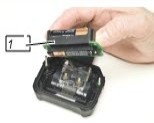
Figure 14 Battery Replacement
|
1 |
Battery holder |
|
|
| 3. | For alkaline battery packs (ALTAIR 5X only): |
| a. | Remove the battery holder circuit board from the pack door. |
| b. | Replace the 3 cells, using only those listed on the label. |
| c. | Be sure to observe proper polarity on the cells. |
| d. | Place the battery holder circuit board back in the device and reinstall the door. |
| 4. | When replacing the battery, be sure to accurately align screws and battery with housing. |
| 5. | Screws should be tightened and torqued to 5.5 in lb (0,62 Nm). |