On-Screen Indicators
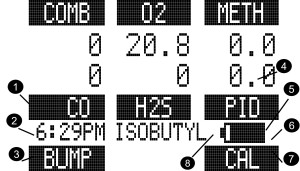
Figure 3 Monochrome Display
| 1 | Gas Type | 5 | Battery Condition | 8 |

|
MotionAlert (+ = ON) |
| 2 | Current Time | 6 | Successful Bump Test/ Calibration Indicator |

|
Sensor Life Indicator | |
| 3 | "Soft Key" q Indicator | 7 | "Soft Key" p Indicator |

|
Bluetooth On/Off | |
| 4 | Gas Reading |
On a monochrome display, a message appears every 30 seconds if the Vibration, Horn, or LED alarms are turned OFF.
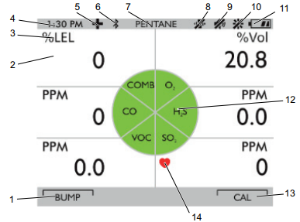
Figure 4 Color Display
| 1 | "Soft Key" q Indicator | 8 |

|
Vibration Alarm OFF | |
| 2 | Gas Reading | 9 |

|
Horn OFF or successful Bump Test / Calibration Indicator | |
| 3 | Gas Concentration Units | 10 |

|
LED OFF | |
| 4 | Current Time | 11 |

|
Battery Charge Level | |
| 5 |

|
Motion Alert symbol ON | 12 | Gas Type | |
| 6 |
 or or |
Wireless USB or Bluetooth ON | 13 | "Soft Key" p Indicator | |
| 7 | Combustible Gas/VOC type | 14 |
|
Sensor Life Indicator |
Battery Charge Level Indicator
The battery condition icon continuously displays in the upper right-hand corner of the display. A bar represents the charging level of the battery.
The nominal run-time of the device (COMB, O2, CO, H2S, and PID sensor) at room temperature is 12 hours. Actual run-time will vary depending on ambient temperature, battery and alarm conditions.
Low Battery Warning
WARNING!
If battery warning alarm activates while using the device, leave the area immediately as the end of battery life is approaching.
Failure to follow this warning can result in serious personal injury or death.
|
|
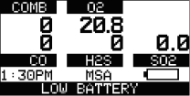
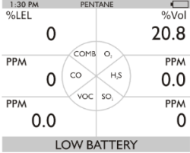
Figure 5 Battery Warning
The duration of remaining device operation during a Low Battery Warning depends on ambient temperatures, battery condition alarm status. Nominal battery life is 30-60 minutes after the Battery Warning activates.
When the device goes into battery warning the:
| • | battery life indicator continuously blinks |
| • | alarm sounds and alarm LEDs flash every 30 seconds |
| • | Safe LED no longer flashes |
| • | device continues to operate until it is turned OFF or battery shutdown occurs. |
Battery Shut Down
WARNING!
If battery alarm displays, stop using the device as it no longer has enough power to indicate potential hazards, and persons relying on this product for their safety could sustain serious personal injury or death.
The device goes into battery shutdown mode 60 seconds before final shutdown (when the batteries can no longer operate the device):
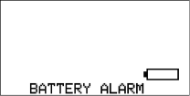
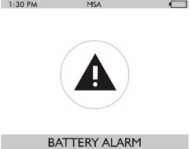
| • | "BATTERY ALARM” flashes on the display |
| • | Alarm sounds |
| • | Alarm LEDs flash |
| • | Fault LED is on |
| • | No other pages can be viewed; after approximately one minute, the device automatically turns OFF. |
|
|
When battery shutdown condition occurs (shown in Figure 6 ):
| 1. | Leave the area immediately. |
| 2. | Recharge or replace the battery pack. |
Battery Charging
WARNING!
Risk of explosion: Do not recharge device in hazardous area.
Failure to follow this warning can result in serious personal injury or death.
WARNING!
Use of any charger, other than the charger supplied with the device, may damage or improperly charge the batteries.
|
For users in Australia/ New Zealand: The charge cradle is a Class A product. In a domestic environment, this product may cause radio interference, in which case, the user may be required to take adequate measures. |
The charger is capable of charging a completely depleted pack in less than six hours in normal, room-temperature environments.
|
Allow very hot or cold devices to stabilize for one hour at room temperature before attempting to charge. |
| • | Minimum and maximum ambient temperature to charge the device is 10 °C (50 °F) and 35 °C (95 °F), respectively. |
| • | For best results, charge the device at room temperature 23 °C (73 °F). |
To Charge the Device
| • | Firmly insert the charger connector into the charge port on the back of the device. |
| • | An LED in the battery pack is used to indicate on the charge status. |
Red = charging, Green = charged, yellow = fault
| • | If a problem is detected during charging (LED turns yellow): |
Disconnect the charger momentarily to reset the charge cycle.
| • | The battery pack may be charged separately from the device. |
| • | During periods of non-use, the charger may remain connected to the device/battery pack. |
|
The charger must be disconnected for the device to operate. |